
Latest version of these slides
Please find the latest version of these slides at:
htools
- Guido Trotter <ultrotter@google.com>
- Helga Velroyen <helgav@google.com>
- (Slides by Klaus Aehlig <aehlig@google.com>)
What is htools?
- A collection of tools to provide auxiliary functionality to Ganeti
- Written in Haskell, separate binaries
- Include:
- hbal: cluster balancing
- hail: instance allocation
- hspace: capacity planning
- hroller: reboot scheduling
- (future) hsqueeze: huddle instances together
hail
(Instance) allocation
hail
(Instance) allocation
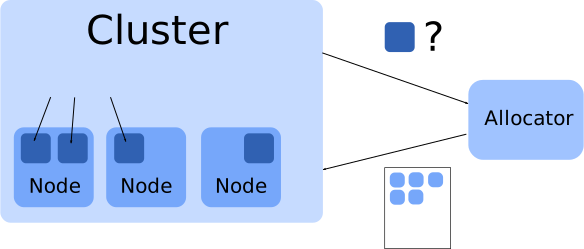
Where to put an instance? - let the cluster figure it out!
gnt-instance add [--iallocator hail] myinstance.example.com
- the allocator is a separate binary,
hail - technically, it is an interface, you can write your own
- protocol:
- JSON over pipes
- input: cluster's state + request-specific info
- output: suggestions where to place which instance
- supported requests: allocate, relocate, change-group, node-evacuate, multi-allocate
hbal
A tool to balance a cluster
Read cluster configuration, calculate, and balance:
hbal -L -X
Read cluster configuration, calculate, don't execute:
hbal -L
Minimal moves to evacuate any "drained" nodes:
hbal -L --evac-mode -X
Migrate only. Don't move any disks:
hbal -L --no-disk-moves
hspace
Introduction
Capacity planning
- How many more instances can I add to my cluster?
- Which resource will I run out first?
So simulate sequentially adding new machines
- until we run out of resources
- allocation done as with hail
- start with maximal size of an instance
(as allowed by the policy) - reduce size if we hit the limit for one resource
hspace
On a live cluster
Use Luxi backend to get live cluster data
# hspace -L
The cluster has 3 nodes and the following resources:
  MEM 196569, DSK 10215744, CPU 72, VCPU 288.
There are 2 initial instances on the cluster.
Tiered (initial size) instance spec is:
  MEM 1024, DSK 1048576, CPU 8, using disk template 'drbd'.
Tiered allocation results:
  -   4 instances of spec MEM 1024, DSK 1048576, CPU 8
  -   2 instances of spec MEM 1024, DSK 258304, CPU 8
  - most likely failure reason: FailDisk
  - initial cluster score: 1.92199260
  -   final cluster score: 2.03107472
  - memory usage efficiency:  3.26%
  -   disk usage efficiency: 92.27%
  -   vcpu usage efficiency: 18.40%
[...]
hspace
The simulation backend
One of the lesser known backends (hspace and hail)
Mainly for cluster planning
- Simulates an empty cluster with given data
- Format
- allocation policy (p=preferred, a=last resort, u=unallocatable)
- number of nodes (in this group)
- disk space per node (in MiB)
- ram (in MiB)
- number of physikal CPUs
- use --simulate several times for more node groups
hspace
Planning a cluster
What if I bought 10 times more disks?
$ hspace --simulate=p,3,34052480,65523,24 \
> --disk-template=drbd --tiered-alloc=1048576,1024,8
The cluster has 3 nodes and the following resources:
  MEM 196569, DSK 102157440, CPU 72, VCPU 288.
There are no initial instances on the cluster.
Tiered (initial size) instance spec is:
  MEM 1024, DSK 1048576, CPU 8, using disk template 'drbd'.
Tiered allocation results:
  -  33 instances of spec MEM 1024, DSK 1048576, CPU 8
  -   3 instances of spec MEM 1024, DSK 1048576, CPU 7
  - most likely failure reason: FailCPU
  - initial cluster score: 0.00000000
  -   final cluster score: 0.00000000
  - memory usage efficiency: 18.75%
  -   disk usage efficiency: 73.90%
  -   vcpu usage efficiency: 100.00%
[...]
hroller
Introduction
When rebooting all nodes (e.g., kernel update), there are several things to take care of.
- Don't reboot primary and secondary at the same time.
- Machine/disks might not come back after reboot.
- When doing live migration, have enough memory.
- No two nodes with primaries, that have the same secondary.
- When fully evacuating, plan for disk space.
hroller
The Default
hroller suggests groups of nodes to be rebooted together.
By default, plan for live migration.
# hroller -L
'Node Reboot Groups'
node-00,node-10,node-20,node-30
node-01,node-11,node-21,node-31
Also possible to only avoid primary/secondary reboots (--offline-maintenance)
or to plan complete node evacuation (--full-evacuation).
# hroller -L --full-evacuation
'Node Reboot Groups'
node-01,node-11
node-00,node-10
node-20,node-30
node-21,node-31
hroller
Moves
For the full evacuation, moves can also be shown (--print-moves). Typically, together with --one-step-only.
# hroller -L --full-evacuation --print-moves --one-step-only
'First Reboot Group'
node-01
node-11
  inst-00 node-00 node-20
  inst-00 node-00 node-10
  inst-10 node-10 node-21
  inst-11 node-10 node-00
hroller
Tags
Nodes to be considered can also be selected by tags. This allows reboots interleaved with other operations.
GROUP=`hroller --node-tags needsreboot --one-step-only --no-headers -L`
for node in $GROUP; do gnt-node modify -D yes $node; done
for node in $GROUP; do gnt-node migrate -f --submit $node; done
# ... wait for migrate jobs to finish
# reboot nodes in $GROUP
# verify...
for node in $GROUP; do gnt-node remove-tags $node needs-reboot; done
for node in $GROUP; do gnt-node modify -D no $node; done
hbal -L -X
Thank You!
Questions?
Survey at https://www.usenix.org/lisa13/training/survey
- © 2010 - 2013 Google
- Use under GPLv2+ or CC-by-SA
