For my thesis paper I had the need to have high-quality diagrams as images to include in my LaTeX document. While TiKz provides a neat way to do so, sometimes it does not cut it, especially if you want to have a certain degree of flexibility or add some signal forms. Furthermore, writing TikZ (CircuitTikz in this case) can be rather convoluted. While solutions such as the online designer exist, IMO a plain drawing is just better.
Inkscape to the rescue
Fortunately, inkscape has all we need to produce high-quality circuit diagrams. Install it via apt, and then first add the electrical symbols library:
git clone  https://github.com/upb-lea/Inkscape_electric_Symbols
mkdir -p .config/inkscape/symbols
cp Inkscape_electric_Symbols/Inkscape_Symbols_all.svg .config/inkscape/symbols
Then open inkscape. The newly added symbols can be found at Objects->Symbols (or press CTRL+Shift+Y). To efficiently draw, press "#" to enable the grid, and set "Enable snapping". This makes it easier to align the objects to the grid.
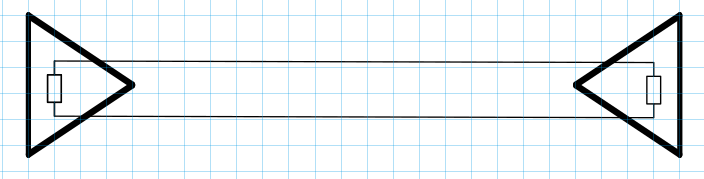
Afterwards, one can just drag and drop symbols from the menu onto the drawing area, and construct a transmission line like this:
Function plotting
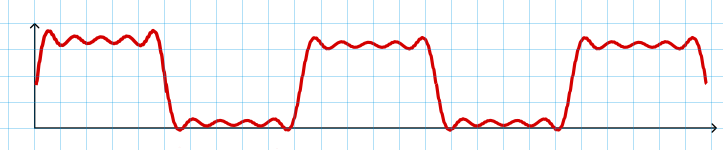
The best part is inkscape also supports plotting signals that follow a mathematical expression. This comes especially in handy if you need to have some signal next to a circuit part. This can be done via Extensions->Render->Function plotter. It is a bit convoluted, since you first need to draw a rectangle, which is then converted to a plot. In this example, I drew a fourier transform of a square wave with five terms:
4/pi*(sin(x)+1/3*sin(3*x)+1/5*sin(5*x)+1/7*sin(7*x)+1/9*sin(9*x))
Then set some defaults: Check "Remove rectangle"; uncheck "Cut with rectangle", "draw axes" and "Add endpoints on x-axis". For the scaling, I chose an x range of -0.5 to 0.5, checked "multiply x values by 2 pi", an y range of -1 to 1, and 100 data points. I also unchecked isotropic scaling and polar coordinates.
The end result (with some inkscape coercing) is a nice jittery rectangluar waveform:
Overall, this is pretty nice and allows for high-quality images. Once the svg is finished, it can easily be exported as png. I recommend a DPI of 300.